
Laboratory Management Software: A Complete Solution for Modern Labs
Discover how Sila Lab laboratory management software helps medical laboratories manage patients, bookings, sample collec...
Read article →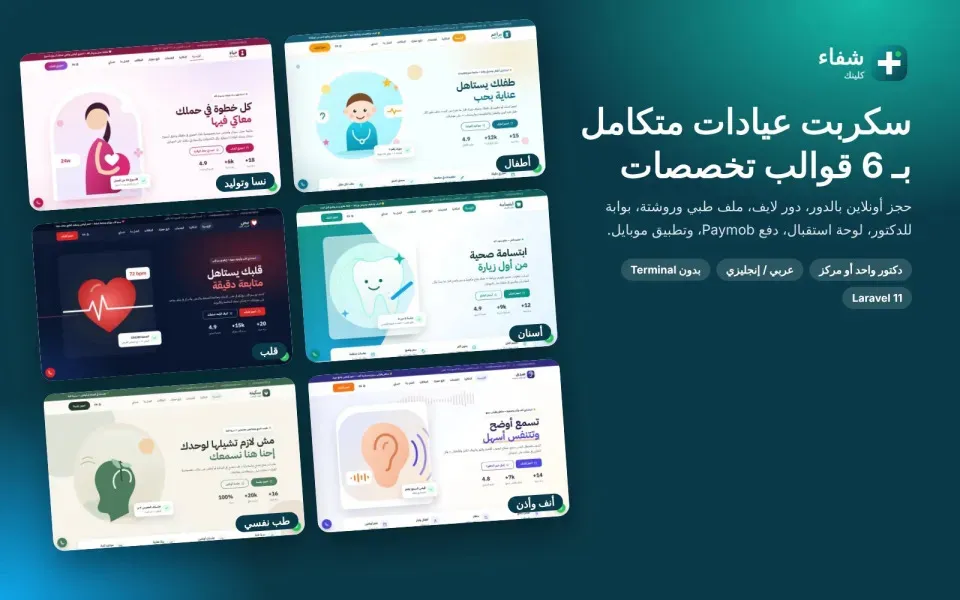
Discover Shifa Clinic by Media Serve, a medical clinic management system featuring online booking, patient records, queue management, and prescriptions.
Modern medical clinics need more than a way to record appointments. Daily operations involve receiving patients, organizing bookings, managing queues, recording visits and diagnoses, creating prescriptions, and helping doctors and reception staff perform their tasks efficiently.
When these activities are spread across notebooks, paper files, and disconnected software, managing daily operations can become more difficult.
That is why Media Serve offers Shifa Clinic, a medical clinic management system that brings several administrative and clinical tools together in one platform.
In this article, we explore the system, its main features, the medical specialties it supports with dedicated templates, and how you can review its interfaces before making a purchase decision.
Shifa Clinic is a medical clinic management system designed to organize different activities within a medical practice, from online appointment booking to patient records and medical visits.
It is designed for doctors, clinic owners, and medical centers looking for a digital platform to manage daily operations instead of relying entirely on manual records.
The system combines several functions, including:
The system allows patients to submit booking requests online and select a doctor, visit type, day, and time according to available appointments and clinic settings.
This provides an organized way to receive patient requests and reduces complete dependence on phone calls.
Organizing patient order is a common challenge in daily clinic operations.
Shifa Clinic supports queue number generation and waiting-order tracking, including the number of people ahead of a patient. This helps clinics organize patient flow.
The system helps clinics maintain recorded patient information, including:
Keeping this information organized makes it easier for authorized users to review previous records.
Shifa Clinic allows users to create and print medical prescriptions with a design that includes the doctor's name and clinic logo.
This helps organize prescription documentation.
The system provides a doctor portal for following schedules, patients, and appointments through a dedicated interface.
The reception screen helps staff monitor bookings, register consultations without prior bookings, and follow payments according to the system's available functions.
This interface supports daily administrative operations and coordination between reception staff and doctors.
One of Shifa Clinic's notable features is the availability of dedicated templates for different medical specialties.
A template designed for pediatric clinics.
A template designed for women's health and obstetrics clinics.
A design intended for dental clinics.
A template designed for cardiology practices.
A template for ENT clinics.
A template designed for mental health and psychiatry clinics.
These templates provide interfaces suited to different specialties while using the clinic management functions available in the system.
The system can support several stages of a patient's visit:
This workflow helps make daily clinic operations more organized.
For clinic owners and developers interested in technical details, the product is built using modern technologies.
Its published specifications include:
Review the current product documentation and hosting requirements before purchasing to ensure compatibility with your environment.
The system may be suitable for the following users, subject to confirming that its configuration matches their requirements:
Paper files and notebooks may be sufficient when a clinic first starts operating. However, as patient numbers and visits increase, managing information becomes more complicated.
Specialized software can help clinics:
Clinics should still protect patient information, assign appropriate user permissions, and maintain regular backups.
It is always useful to review a system and explore its interfaces before choosing software for your clinic.
You can learn more about Shifa Clinic through the following links:
Product Page:
https://code.mediaserves.com/products/shifa-clinic
Live Demo:
https://clinic.mediaserves.com/
Media Serve Official Website:
Review the product details, hosting requirements, and available updates before completing your purchase.
Shifa Clinic is a medical clinic management system that helps organize appointments, patients, medical records, visits, and prescriptions.
Yes. The system supports online booking, including doctor, visit type, day, and time selection.
Yes. It supports queue number generation and waiting-order tracking, including the number of people ahead of a patient.
Yes. It includes six templates covering pediatrics, obstetrics and gynecology, dentistry, cardiology, ENT, and psychiatry.
Yes. It supports Arabic and English, including right-to-left and left-to-right text directions.
Yes. The system allows users to create and print medical prescriptions that include the doctor's name and clinic logo.
According to the published product specifications, installation and updates can be performed through the browser without requiring Terminal.
Media Serve provides software and technology solutions designed to help businesses improve their digital operations.
Shifa Clinic is one of these solutions, bringing together features that help medical clinics manage bookings, patients, and medical records through one system.
If you are looking for medical clinic management software, explore Shifa Clinic and review the live demo before making your decision.
Contact Media Serve:
Discover how Sila Lab laboratory management software helps medical laboratories manage patients, bookings, sample collec...
Read article →
Discover how an online lab test booking system helps medical laboratories manage appointments, home sample collection, p...
Read article →
Discover how a medical laboratory app improves patient services, test result access, sample collection management, and l...
Read article →No comments yet — be the first!